The acronym HTTP stands for HyperText Transfer Protocol.
HyperText: Refers to text that contains links (hyperlinks) to other text or resources.
Transfer: The act of moving data from one place (the server) to another (the client).
Protocol: A set of formal rules that defines how computers communicate with each other, ensuring that data is transferred correctly and reliably.
HTTP requests (clients) and responses (servers) are basically just plain text messages with an optional textual or binary content, often referred to as body or payload. Although we usually work with HTTP requests and responses that have already been parsed into structured data (e.g., JSON data converted to JavaScript objects), it might be illustrative to look at (simplified) examples of the plain-text format messages that are actually transferred between client and server.
Before we dive into the details, here is a quick introduction into the HTTP Protocol:
https://youtu.be/KvGi-UDfy00?si=FtqKQqZVEd_Xy2u9
Here is a plain-text example of an HTTP request to an API at deckofcards.com that we will revisit in an exercise for week 10:
GET /api/deck/734iqo5k0u8b/draw/?count=1 HTTP/2
Host: [deckofcardsapi.com](<http://deckofcardsapi.com/>)
User-Agent: Mozilla/5.0 (Macintosh; Intel Mac OS X 10.15; rv:145.0) Gecko/20100101 Firefox/145.0
Accept: **/**
Accept-Language: en-US,en;q=0.5
Accept-Encoding: gzip, deflate, br, zstd
Origin: [<http://127.0.0.1:5500>](<http://127.0.0.1:5500/>)
Connection: keep-alive
(some lines omitted for brevity)
In this example JavaScript code running in the browser (i.e., the client) sends a GET request for the data associated with the path /api/deck/734iqo5k0u8b/draw/?count=1. When the server (i.e., the host) receives this request it will break it down (i.e. parse it) into a number of components. The first line specifies the Request Method, Path and the HTTP Protocol Version used for this request.
GET/HTTP/2The text lines following the first line represent the Request Headers, each line making up one request header. A request header consists of a name and value, separated by a colon. For the above example request, these are given in the table below.
| Header | Value | Description |
|---|---|---|
| Host | deckofcardsapi.com | The domain name of the server to which the request is addressed. |
| User-Agent | Mozilla/5.0 (Macintosh; Intel Mac OS X 10.15; rv:145.0) Gecko/20100101 Firefox/145.0 | Identifies this request as originating from a web browser. In this case a FireFox browser was used. This information allows the server to optimise its response for this client. |
| Accept | \/** | The response content types that the client can handle. The */* wildcard specification indicates that the client does not express any preference. |
| Accept-Language | en-US,en;q=0.5 | The preferred ISO language for the response. |
| Origin | http://127.0.0.1:5500 | The IP address of the device making the request. In this case, it is a local IP address, such as used when using Open in Live Server command in VS Code. |
| Connection | keep-alive | A request to the server to keep the client-server connection open, as additional requests may follow quickly, e.g. for associated CSS style sheets and JavaScript files. |
GET requests, as this example, do not use a body part.
For now, knowing the exact meaning of these headers is not needed. We will come back in later chapters on the most important ones. At present, it suffices to know that an HTTP request includes request headers.
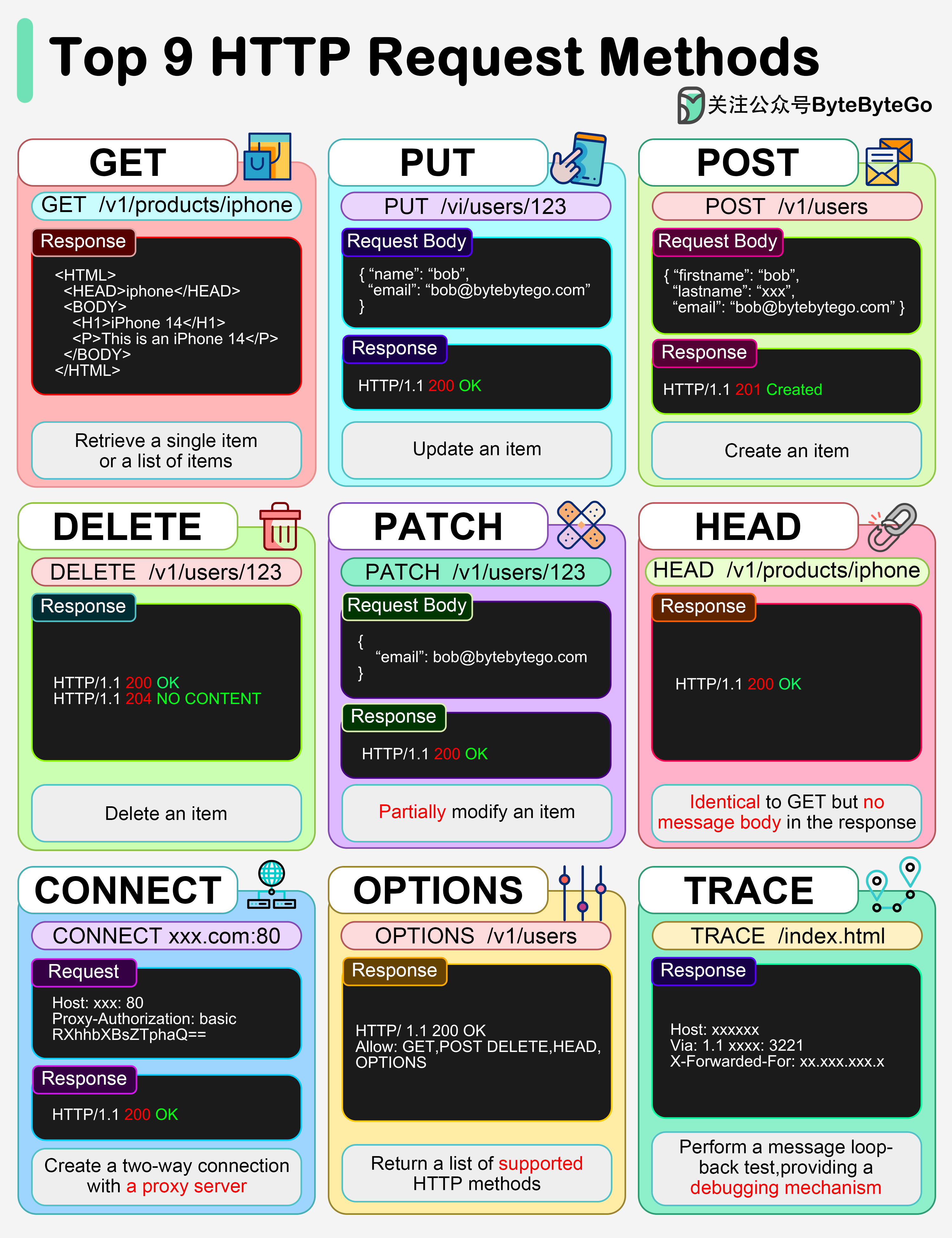
GET asks the server to send back a resource. It should never change anything on the server — it is read-only.
GET /posts          → fetch a list of posts
GET /posts/42       → fetch a single post with id 42
POST sends data to the server to create a new resource. The data is included in the request body.
POST /posts → create a new post (body contains the post data)
PUT sends a complete replacement for an existing resource. The entire resource is overwritten with what you send.
PUT /posts/42 → replace post 42 entirely with new data
PATCH sends only the fields you want to change, leaving the rest of the resource untouched.
PATCH /posts/42 → update only the title of post 42
DELETE tells the server to remove a resource.
DELETE /posts/42 → delete post 42
| Method | Action | Has body? | Changes data? |
|---|---|---|---|
| GET | Read | No | No |
| POST | Create | Yes | Yes |
| PUT | Replace | Yes | Yes |
| PATCH | Update part | Yes | Yes |
| DELETE | Delete | No | Yes |
Source: ByteByteGo provided under a CC BY-NC-ND 4.0 license
Two useful properties to know:
GET is safe)GET, PUT, and DELETE are idempotent; POST is not — each POST typically creates a new resource)At the TCP/IP level, all of these methods travel inside the same TCP connection — HTTP is just a text protocol layered on top. When your browser visits a URL, it opens a TCP connection to the server and sends something like this:
GET /posts HTTP/1.1
Host: example.com
The server reads that text, processes the request, and replies with a status code and (optionally) a body. The method is just the first word on the first line.
The HTTP Response to the HTTP request from the previous section looks like this (it is again a text-based response):
HTTP/2 200
date: Thu, 27 Nov 2025 16:06:13 GMT
content-type: application/json
server: cloudflare
access-control-allow-origin: *
(some lines omitted for brevity)

{
  "success": true,
  "deck_id": "734iqo5k0u8b",
  "cards": [
    {
      "code": "5H",
      "image": "<https://deckofcardsapi.com/static/img/5H.png>",
      "images": {
        "svg": "<https://deckofcardsapi.com/static/img/5H.svg>",
        "png": "<https://deckofcardsapi.com/static/img/5H.png>"
      },
      "value": "5",
      "suit": "HEARTS"
    }
  ],
  "remaining": 51
}
The first line contains the following information:
HTTP/2200The status code 200 stands for OK, meaning that the server processed the request successfully, resulting in the response at hand. HTTP status codes will be discussed in more detail in the next section.
The next response lines, up to the blank line, make up the Response Headers. The Content begins after the blank line and extends to the end of the response.
| Header | Value | Description |
|---|---|---|
| date | Thu, 27 Nov 2025 16:06:13 GMT | The date of the response. |
| server | cloudflare | The name of the HTTP server software accepting HTTP requests on the server. |
| content-type | application/json | The type of content, i.e. how the requestor should interpret the content. In this example the textual content should be interpreted as JSON. |
| access-control-allow-origin | * | The wildcard * indicates that API accept requests from any origin, and not just from the same origin as the server at deckofcardsapi.com. An API that allows this is said to support CORS (Cross-Origin Resource Sharing). |
The content in this example is a JSON string. In the JavaScript application this string can be converted into a JavaScript object through the JSON.parse() function.
More info: https://developer.mozilla.org/en-US/docs/Web/JavaScript/Reference/Global_Objects/JSON/parse
HTTP status codes are three-digit numbers returned by a web server in response to an HTTP request (like requesting a web page). They indicate the outcome of the request, essentially telling the client (usually your web browser) whether the request was successful, if it was redirected, if there was a client error, or if there was a server error.
The first digit of the status code defines the class of response:
| --- | --- | --- |
For web APIs the most commonly used ones are in the 2xx and 4xx ranges.
| --- | --- | --- | --- |
| --- | --- | --- | --- |
More info: https://developer.mozilla.org/en-US/docs/Web/HTTP/Reference/Status
The Content-Type header in HTTP requests and responses is used to indicate the media type of the resource being sent in the message body.
This header tells the recipient (the server for a request, or the client/browser for a response) exactly what kind of data is contained in the body, which is necessary for the recipient to process or display it correctly. The most common media types when working with API are:
| --- | --- | --- |
Other examples of media types, for instance for HTML, CSS and JavaScript files as loaded by a web browser when visiting a site, are respectively text/html, text/css and text/javascript.